

4 Best Apps To Limit Screen Time (That REALLY Work)
I used to watch videos of people who read entire literary novels in just a few days and rode their bikes to the local park to sketch urban architecture in their art journal.
“I wish I had time to do that!” I thought to myself without irony.
The irony was, of course, that I was spending 3-4 hours a day watching reviews of novels I’d never read and carousels of watercolors I’d never paint.
If you’d asked me then how much time I really spent online, I would have confidently told you about 1 hour. At most.
My life changed the day I started tracking my screen time.
It was a rude but much-needed awakening: I was actually scrolling about 3 to 4 hours a day.
Ouch.
I actually did have time to read and draw.
Which apps actually worked – and why
Nothing snapped me out of my digital stupor quite like seeing the pure data analysis, charts and graphs of my embarrassing phone addiction.
Did I seriously spend 3 hours on my phone yesterday?
Yes I did. In fact, there’s the nifty graph that shows I scrolled for 47 minutes right after I woke up, and scrolled another 2 hours and 19 minutes right before I went to sleep.
The data cut through my excuses and gave me real, tangible evidence of when I scrolled and how often I picked up my phone.
I also loved apps that gave me gentle, mindful pauses and apps that gamified my offline time and rewarded me with grown trees and forests.
Why strict blockers backfired
Many apps let you set specific time limits for certain apps. And when you go over those time limits, they block you from accessing those apps.
Honestly: the apps that focus on strict block modes never really worked for me.
Because they’re like a diet that limits your access to chocolate cake. And just leaves you thinking about chocolate cake all day.
And if you have a rebellious streak, you won’t be told what to do. You’ll end up scrolling YouTube Shorts right after you limit your access to Instagram Reels (true story).
Shifting from restriction to mindfulness
I love apps that show me irrefutable data that I can’t really argue with. I can pick up my behavior patterns and get to the root of why I scroll.
I love apps that give me visual, gamified rewards for the hours I spend doing focused work (I’m actually growing a tree as I type this.)
And I love apps that give me mindful strategies to change my habits. They don’t lock away the chocolate cake – they give me tastier dessert options.
If you’re ready to hit pause on the bottomless scroll, here are my gold-standard apps to limit your screen time (after months of trial and error):
1. StayFree (iOS, Android, Chrome, Firefox)
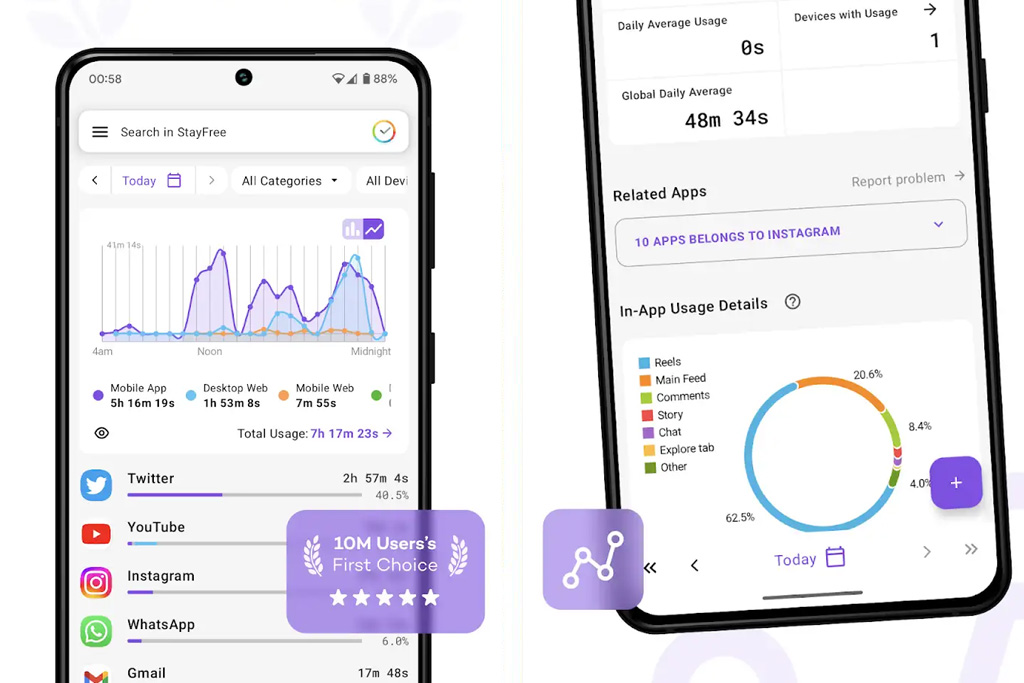
StayFree changed my life – and it’s still my favorite go-to app to limit my screen time.
I can’t argue with its hard statistics and minute-by-minute metrics. It’s a real eye-opener that cuts through all of your screen time excuses.
Best for: deep analytics, graphs and charts.
How it works: It tracks your exact screen time across apps and websites, then gives you detailed charts. It also lets you set strict daily limits for specific apps – and gives you alerts when you’re pushing your limits.
Aesthetic: analytical, insightful, data-driven.
2. Forest (iOS and Android)
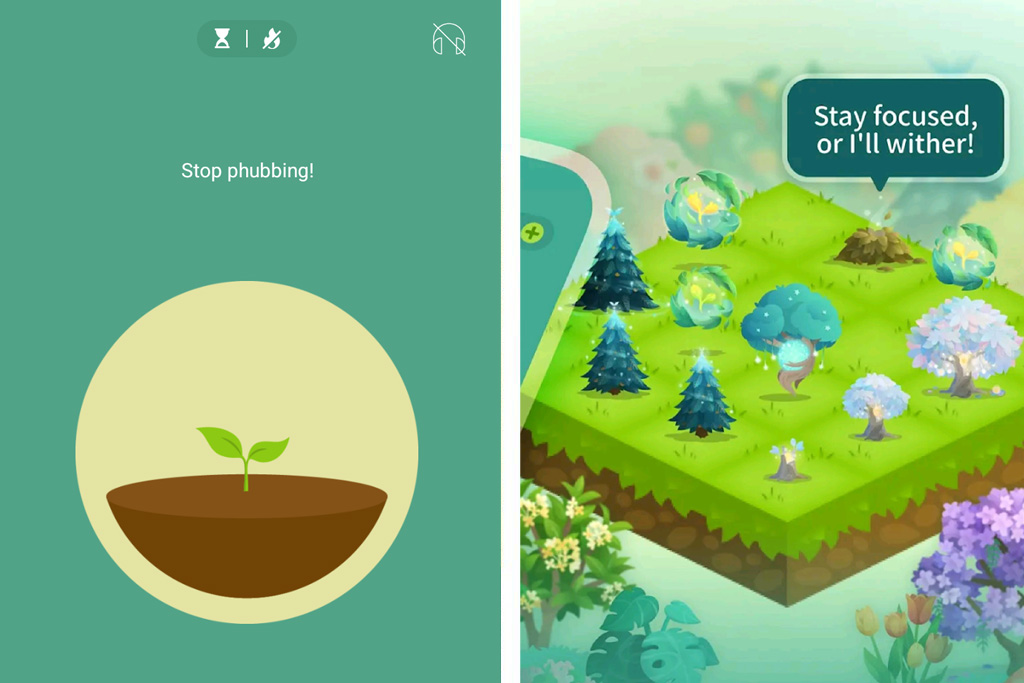
It’s amazing how growing a virtual tree (or flowery bush) on your phone can motivate you to stay focused.
Because who wants to pick up their phone just to quickly check their WhatsApp for the hundredth time and ruin 1.5 hours of tree growth?
I use the Forest app every single day to keep myself on-track while working in time blocks. It lets me cut out distractions (like my Facebook feed and email inbox) that would otherwise kill my attention span and waste hours of my time.
Best for: A gamified way to stay focused.
How it works: Whenever you want to stay off your phone, open the Forest app and plant a virtual seed. Your seed grows into a tree for as long as you stay off your blocked apps. You can set the timer from 10 to 120 minutes (2 hours). If you leave the app to scroll social media, the tree quickly withers.
Aesthetic: nature-centric and calming (and, for me, vaguely reminiscent of the plant life in the early Mario Bros. games).
3. ScreenZen (iOS and Android)
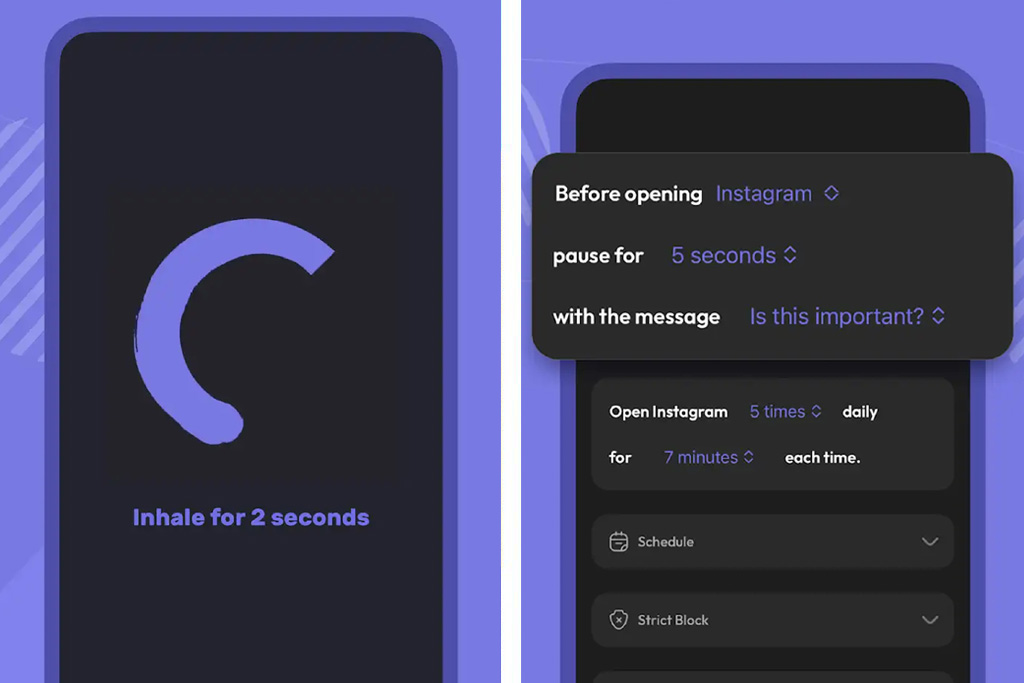
With its gentle reminders and calm purple interface, ScreenZen is a great option for a mindful approach to limiting screen time.
It reduces compulsive app opening by giving you breathing exercises before opening your apps. Take a few deep breaths and chances are you’ll think again before checking your Instagram comments for the 50th time today.
Best for: Mindful pauses that focus on raising awareness of your social media habits instead of restricting access to apps.
How it works: Instead of a hard block, ScreenZen lets you limit the number of times you open an app per day. It also gives you pauses before you open a social media app. The pauses ask you to take deep breaths, or (my favorite) they ask you questions like “Is this important” and “Why am I checking?”
Aesthetic: Simple, minimal interface in calming purples and blacks.
4. Opal (iOS and Android)
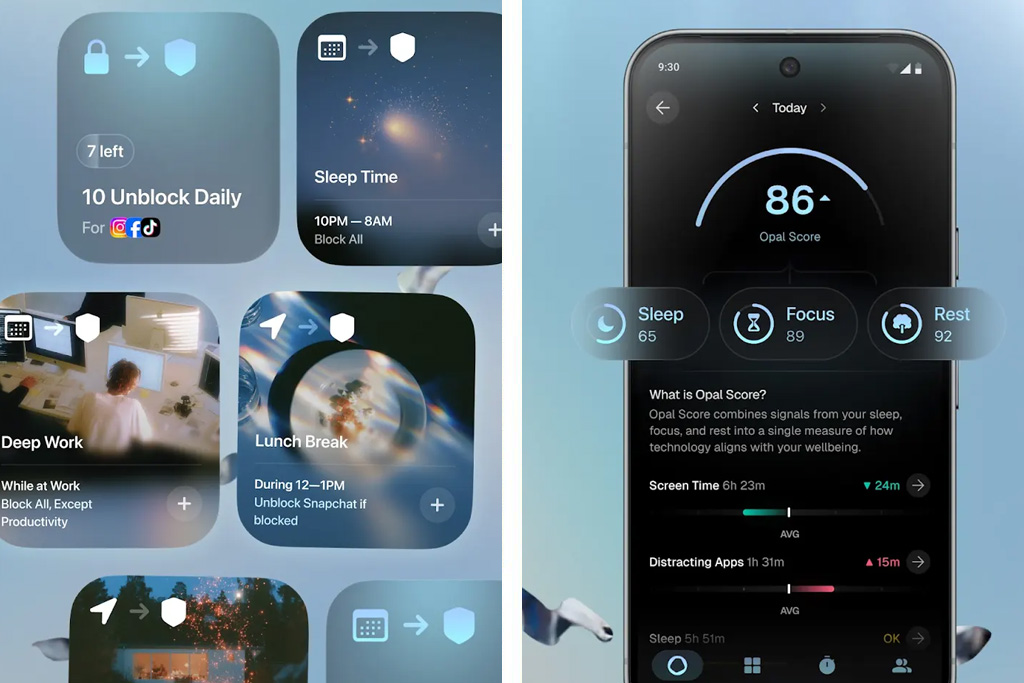
Opal is perfect to shift your habits and re-build your ability to focus.
It also lets you fully customize your everyday routine. So you can block all your apps during sleep time, allow certain messaging apps during work hours and then allow YouTube for 30 minutes after dinner, etc.
Best for: building a fully customized day that lets you restrict certain apps at certain times.
How it works: Opal is highly customizable and lets you set up regular, automatic focus sessions throughout the day (like during work hours or right before bed). It also gives you a daily focus score to gamify the progress.
Aesthetic: Sleek, modern and data-driven.
Read more:
26 Powerful Digital Detox Quotes About Tech Addiction

Really liked your point that the best screen-time solution isn’t necessarily the strictest one. It’s about finding something that actually changes your habits.
I’ve been using Jolt for about a year, and it’s helped me become much more intentional with my phone. What I like is being able to create boundaries around distracting apps, set focus sessions, and protect certain parts of my day without feeling like I have to give up my phone completely.
Different approaches work for different people, but having a little friction between the impulse to scroll and actually opening an app can make a surprisingly big difference.
Not sponsored, just sharing what has genuinely worked for me.